Jellyseerr Multimedia Stack

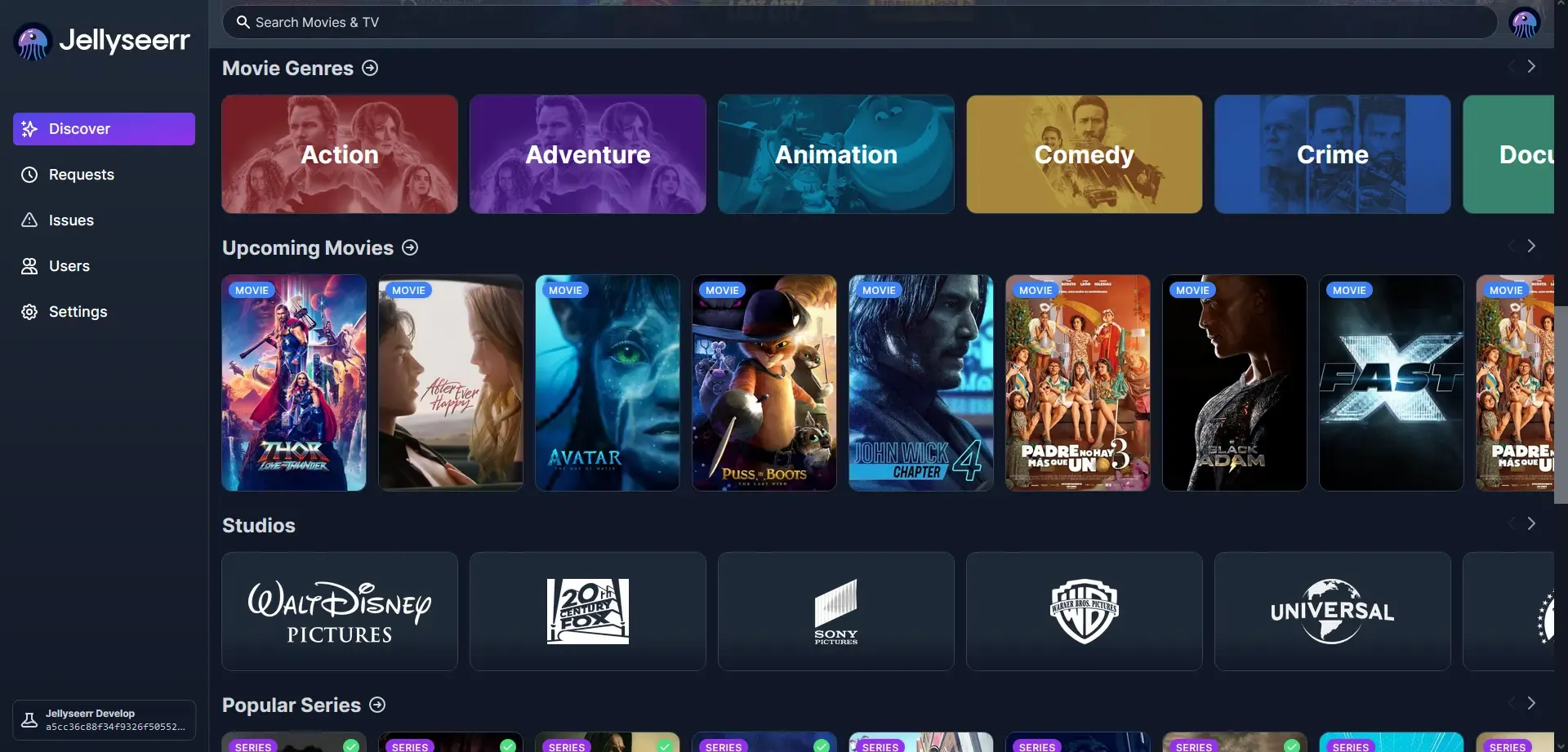
Yes I have tested it and it works just fine, however it can be complicated to setup beyond just the stack. There is considerable work required that cant be automated with each service as it flows down the chain.
This stack is not for a novice but its not rocket science either, but yes it is a pain in the arse to configure as you have numerous services to get running and bug free for that "click" to work seamlessly.
Purpose
Find a movie or a series via Jelllyseer. Click on the appropriate icon. Watch a trailer, read the breakdown, request the movie. The rest should just happen. Simple.
This is your own multimedia server with a request function, and index function and it talks directly to Jellyfin. Nice, neat and tidy.
Yeah right.
Notes
- The stack is self explanatory
- You will need to setup your reverse proxy and your cname entries in your DNS server - do this first.
- You will need to setup Jellyseer via settings, adding Jellyfin, users, services, and so on.
- The qbittorrent server will require a new admin username and password. Sort this once the stack comes up, and dont forget the password. It requires hacking to reset it.
- The API Keys you will need to change and I cant remember how I did it. Sorry this is not my day job (I do this for fun to exercise my mind).
- Mine is CUDA enabled. You may need to remove this part.
- I built my stack for Podman not Docker but you should be able to figure it out.
The Multimedia Stack
As per below.
- Changes were required to ensure that updates happened smoothly
- An .env file will be required for the appropriate placeholders
# =============================================================================
# Multimedia Media Stack — baden.braedach.com
# =============================================================================
# Services:   Jellyfin, Jellyseerr, Sonarr, Radarr, Prowlarr, Bazarr,
#             Flaresolverr, qBittorrent
# Host:       baden (192.168.1.16) — Proxmox LXC, NVIDIA RTX 3070 (CDI)
# Runtime:    Podman (rootful) with Docker Compose compatibility
# Network:    jellyfin-net (internal, defined in this file)
# UID/GID:    1000:1000 — set via PUID/PGID (linuxserver/hotio) or entrypoint env
# Proxy:      Zoraxy reverse proxy via Cloudflare tunnel (braedach.com)
# CNAME:      All CNAMEs point to proxy, not container IPs
#
# STATUS:     Deployed 2026-10-06: Jellyfin 12.2 + Seerr 3.5.0 (one-way DB migration already applied). Rollback = stop,
#             restore a Jellyfin config backup, redeploy stack-multimedia.yml (10.11 / v3.4.1). The pre-upgrade backup was removed at sign-off.
#
# Version:    1.6.2
# Updated:    2026-10-06
#
# Changelog:
#   1.6.2 (2026-10-06) - Jellyfin start_period set back to 60s: the 12.x migration has completed and testing is signed off (laptop, Android TV, Radarr/Sonarr connection tests OK). Pre-upgrade backup on baden removed at sign-off; rollback is now redeploying stack-multimedia.yml (10.11 / v3.4.1), which only works with a restored DB if one is taken again.
#   1.6.1 (2026-10-06) - Seerr image moved from ghcr.io/seerr-team/seerr to docker.io/seerr/seerr (same v3.5.0, identical amd64 digest sha256:c33702abebce...) because GHCR rate-limited the pull to ~100 KB/s. Jellyfin start_period is still 900s - set it back to 60s once testing is signed off.
#     Tested 2026-10-06 (before and after deploy):
#       - Backup taken with checksums verified: Jellyfin config + consistent DB copy, Seerr settings + DB copy.
#       - Pre-flight on the live DB: integrity_check ok, 0 foreign-key violations, no case-duplicate usernames, no plugins.
#       - Dry run of Jellyfin 12.2 on a copy of the DB (no network, no media): 19 migrations applied in ~2s, no hang.
#       - 466 placeholder OwnerId rows (the open #17907 pattern) migrated without a foreign-key failure.
#       - NVENC on host driver 550.163.01 with FFmpeg 8.1.3: h264_nvenc, hevc_nvenc and CUDA decode OK, in the dry run and in the live container.
#       - Live deploy: migration ~7.7s, startup ~5s, /health 200, no [FTL] and no real [ERR] in the log.
#       - Live DB after migration: integrity ok, 0 FK violations, 467 items / 4 users / 30 user-data rows unchanged.
#       - Media mounts intact in the container (5 movies), so no library data at risk from the 12.x cleanup.
#       - Seerr 3.5.0 /api/v1/status OK (no update pending) and Seerr reaches Jellyfin 12.2 inside jellyfin-net.
#       - All 8 stack containers healthy; the other 35 containers on baden were unaffected.
#     Manual tests signed off 2026-10-06: laptop playback, Android TV app, Radarr/Sonarr connection Test. Not separately confirmed: full library scan and other TV brands.
#   1.6.0 (2026-10-06) - Jellyfin 10.11 -> 12.2 and Jellyseerr/Seerr v3.4.1 -> v3.5.0. Jellyfin 12.2 (released 2026-10-05) carries the ChangeOwnerIdToGuid migration-hang fix (jellyfin/jellyfin#18073, fixes #18066); Seerr 3.5.0 carries the Jellyfin 12 Authorization-header fix (seerr-team/seerr#3502). Both tags confirmed on GHCR before pinning. Jellyfin healthcheck start_period raised 60s -> 900s so the first-boot migration is not reported unhealthy (and Seerr's service_healthy gate is not failed) - drop it back to 60s once the migration has completed. Still open upstream: #17907 (FOREIGN KEY failure from pre-existing orphaned OwnerId/ParentId rows) - run PRAGMA integrity_check / foreign_key_check against a COPY of jellyfin.db before upgrading. Jellyfin 12 behaviour changes: legacy authorization off by default and /emby/* routes removed (re-test the Sonarr/Radarr Jellyfin connection and old clients), plugins must be removed before migrating, a full library scan is required afterwards. Seerr 3.5.0 breaking change affects only direct API callers of GET /settings/{plex,jellyfin}/library (sync/enable params removed). stack-multimedia.yml (prod) deliberately NOT changed - it remains the rollback copy at Jellyfin 10.11 / Seerr v3.4.1.
#   1.5.3 (2026-09-16) - Jellyseerr pinned to v3.4.1 (was :latest, confirmed running version) - locks it alongside the Jellyfin 10.11 hold below so it can't drift onto a build that assumes Jellyfin 12's API. Confirmed v3.4.1 exists on GHCR before pinning.
#   1.5.2 (2026-09-16) - Jellyfin pinned to 10.11 (was :latest) - Jellyfin 12.0/12.1 is a breaking major (plugin API, .NET 10, FFmpeg 8.1, one-way DB migration) with open, unresolved migration-corruption bugs upstream (jellyfin/jellyfin#17863, #17907, #18066) as of 2026-09-16. Hold on 10.11 until those are confirmed fixed and Seerr's Jellyfin-12 compatibility is confirmed. See Docs for full analysis.
#   1.5.1 (2026-09-05) - Jellyseerr RADARR_API_KEY/SONARR_API_KEY pulled out into .env (${RADARR_API_KEY}/${SONARR_API_KEY}) - were hardcoded in plaintext; rotate both keys since they were previously committed to this file
#   1.5.0 (2026-09-05) - Bazarr depends_on: sonarr/radarr changed service_healthy -> service_started - fixes Bazarr getting stuck in "Created" (never starts) after a stack-wide stop/pull/redeploy, caused by a compound two-service health gate missing a slow post-pull healthcheck
#   1.4.2 (2026-08-19) - Sonarr/Radarr: qbittorrent dependency upgraded to condition: service_healthy (was start-order only) - fixes startup race that broke qBittorrent WebUI auth on restart
#   1.4.1 (2026-08-19) - Fixed corrupted depends_on block (bazarr->sonarr) and stray text in jellyfin port comment - leftover from relocating image: to top of each block
#   1.4.0 (2026-08-19) - :U flag added to all writable config/media volumes, matching other stack files
#   1.3.0 (2026-08-19) - Bazarr: linuxserver -> hotio/bazarr, config volume remapped to /config/app
# =============================================================================
#
# Volume layout expected on host (create before first run):
#   sudo mkdir -p \
#     /srv/jellyfin/{cache,config,media/movies,media/series,music} \
#     /srv/jellyseerr/config \
#     /srv/sonarr/config \
#     /srv/radarr/config \
#     /srv/prowlarr/config \
#     /srv/bazarr/config \
#     /srv/qbittorrent/{config,downloads,downloads/incomplete,plugins}
#   sudo chown -R 1000:1000 /srv/jellyfin /srv/jellyseerr /srv/sonarr /srv/radarr /srv/prowlarr /srv/bazarr /srv/qbittorrent
#
# Requires a .env file alongside this compose file with:
#   RADARR_API_KEY=...
#   SONARR_API_KEY=...
#
# GPU passthrough:
#   - CDI configured via setup-lxc-gpu.sh on pxe/baden.
#   - Jellyfin uses NVENC/NVDEC for hardware transcoding — enable in:
#   - Dashboard > Playback > Transcoding > NVIDIA NVENC
#
# Podman notes:
#   - Do NOT add a 'user:' directive to linuxserver images — it conflicts with s6-overlay init which handles UID/GID internally via PUID/PGID.
#   - Jellyfin uses its own entrypoint; pre-chown volumes as shown above.
#   - :U flag on writable config/media volumes — recursive chown to container UID, not strictly required on rootful podman, kept for consistency with other stack files. Not applied to read-only mounts (e.g. /etc/localtime).
#   - FlareSolverr runs as root internally; PUID/PGID not supported.
#   - Bazarr (hotio image) stores config at /config/app, not /config — host path unchanged, container mount remapped.
#   - Bazarr's depends_on for sonarr/radarr uses service_started, not service_healthy — avoids a compound two-service health gate that can miss timing on a full-stack pull+redeploy (see changelog 1.5.0).
#   - Watchtower disabled on all services — update manually or via script.
#   - Jellyfin pinned to 12.2 (see changelog 1.6.0) — do NOT move to :latest. The 12.x migration is one-way:
#     keep a full backup of /srv/jellyfin/config taken before the first 12.x boot. Rollback = stop, restore, repin 10.11.
#   - Jellyseerr pinned to v3.5.0 (see changelog 1.6.0) — kept in lockstep with the Jellyfin pin above.

services:

  # ---------------------------------------------------------------------------
  # Jellyfin — Media Server
  # ---------------------------------------------------------------------------
  jellyfin:
    image: ghcr.io/jellyfin/jellyfin:12.2   # pinned — do not move to :latest, see changelog 1.6.0
    container_name: jellyfin
    hostname: jellyfin
    restart: always
    labels:
      - com.docker.compose.project=multimedia
      - com.docker.compose.service=jellyfin
      - homepage.group=Media
      - homepage.name=Jellyfin
      - homepage.href=https://jellyfin.baden.braedach.com
      - homepage.icon=jellyfin.png
    ports:
      - "8096:8096"        # Zoraxy Access port
      - "7359:7359/udp"    # LAN client auto-discovery
      - "1900:1900/udp"    # DLNA SSDP multicast
    environment:
      - TZ=Australia/Perth
      - JELLYFIN_PublishedServerUrl=https://jellyfin.baden.braedach.com
      - NVIDIA_VISIBLE_DEVICES=all
      - NVIDIA_DRIVER_CAPABILITIES=all,compute,utility
    volumes:
      - /srv/jellyfin/cache:/cache:U
      - /srv/jellyfin/config:/config:U
      - /srv/jellyfin/media/movies:/movies:U
      - /srv/jellyfin/media/series:/series:U
      - /srv/jellyfin/music:/music:U
      - /etc/localtime:/etc/localtime:ro
    devices:
      # Podman CDI — NVIDIA RTX 3070 passthrough (configured via setup-lxc-gpu.sh)
      - nvidia.com/gpu=all
    cap_add:
      - SYS_TIME
    security_opt:
      - no-new-privileges:true
    healthcheck:
      test: ["CMD-SHELL", "curl -sf http://localhost:8096/health || exit 1"]
      interval: 30s
      timeout: 10s
      retries: 3
      start_period: 60s
    networks:
      - jellyfin-net

  # ---------------------------------------------------------------------------
  # Jellyseerr — Media Request Management
  # ---------------------------------------------------------------------------
  jellyseerr:
    image: docker.io/seerr/seerr:v3.5.0   # pinned — do not move to :latest; Docker Hub because GHCR rate-limited, see changelog 1.6.1
    container_name: jellyseerr
    hostname: jellyseerr
    restart: always
    labels:
      - com.docker.compose.project=multimedia
      - com.docker.compose.service=jellyseerr
      - homepage.group=Media
      - homepage.name=Jellyseerr
      - homepage.href=https://jellyseerr.baden.braedach.com
      - homepage.icon=jellyseerr.png
    ports:
      - "5055:5055"
    environment:
      - TZ=Australia/Perth
      - LOG_LEVEL=info
      # Pre-seeds Jellyfin connection on first run (ignored if config already exists)
      - JELLYFIN_URL=http://jellyfin:8096
      - RADARR_URL=http://radarr:7878
      - RADARR_API_KEY=${RADARR_API_KEY}
      - SONARR_URL=http://sonarr:8989
      - SONARR_API_KEY=${SONARR_API_KEY}
    volumes:
      - /srv/jellyseerr/config:/app/config:U
      - /etc/localtime:/etc/localtime:ro
    depends_on:
      jellyfin:
        condition: service_healthy
    security_opt:
      - no-new-privileges:true
    healthcheck:
      test: wget --no-verbose --tries=1 --spider http://localhost:5055/api/v1/settings/public || exit 1
      start_period: 20s
      timeout: 3s
      interval: 15s
      retries: 3
    networks:
      - jellyfin-net

  # ---------------------------------------------------------------------------
  # Sonarr — TV Series Automation
  # ---------------------------------------------------------------------------
  sonarr:
    image: lscr.io/linuxserver/sonarr:latest
    container_name: sonarr
    hostname: sonarr
    restart: always
    labels:
      - com.docker.compose.project=multimedia
      - com.docker.compose.service=sonarr
    ports:
      - "8989:8989"
    environment:
      - TZ=Australia/Perth
      - PUID=1000
      - PGID=1000
      - SONARR__LOG__LEVEL=info
      - SONARR__ANALYTICS__ENABLED=false
      # External auth — Zoraxy handles access control; disable Sonarr's own login
      - SONARR__AUTH__METHOD=External
      - SONARR__AUTH__REQUIRED=DisabledForLocalAddresses
    volumes:
      - /srv/sonarr/config:/config:U
      - /srv/jellyfin/media/series:/series:U
      - /srv/qbittorrent/downloads:/downloads:U
      - /etc/localtime:/etc/localtime:ro
    depends_on:
      prowlarr:
        condition: service_started
      qbittorrent:
        condition: service_healthy
    security_opt:
      - no-new-privileges:true
    healthcheck:
      test: ["CMD-SHELL", "curl -sf http://localhost:8989/ping || exit 1"]
      interval: 30s
      timeout: 10s
      retries: 3
      start_period: 30s
    networks:
      - jellyfin-net

  # ---------------------------------------------------------------------------
  # Radarr — Movie Automation
  # ---------------------------------------------------------------------------
  radarr:
    image: lscr.io/linuxserver/radarr:latest
    container_name: radarr
    hostname: radarr
    restart: always
    labels:
      - com.docker.compose.project=multimedia
      - com.docker.compose.service=radarr
    ports:
      - "7878:7878"
    environment:
      - TZ=Australia/Perth
      - PUID=1000
      - PGID=1000
      - RADARR__LOG__LEVEL=info
      - RADARR__ANALYTICS__ENABLED=false
      # External auth — Zoraxy handles access control; disable Radarr's own login
      - RADARR__AUTH__METHOD=External
      - RADARR__AUTH__REQUIRED=DisabledForLocalAddresses
    volumes:
      - /srv/radarr/config:/config:U
      - /srv/jellyfin/media/movies:/movies:U
      - /srv/qbittorrent/downloads:/downloads:U
      - /etc/localtime:/etc/localtime:ro
    depends_on:
      prowlarr:
        condition: service_started
      qbittorrent:
        condition: service_healthy
    security_opt:
      - no-new-privileges:true
    healthcheck:
      test: ["CMD-SHELL", "curl -sf http://localhost:7878/ping || exit 1"]
      interval: 30s
      timeout: 10s
      retries: 3
      start_period: 30s
    networks:
      - jellyfin-net

  # ---------------------------------------------------------------------------
  # Prowlarr — Indexer Management (feeds Sonarr + Radarr)
  # ---------------------------------------------------------------------------
  prowlarr:
    image: lscr.io/linuxserver/prowlarr:latest
    container_name: prowlarr
    hostname: prowlarr
    restart: always
    labels:
      - com.docker.compose.project=multimedia
      - com.docker.compose.service=prowlarr
    ports:
      - "9696:9696"
    environment:
      - TZ=Australia/Perth
      - PUID=1000
      - PGID=1000
      - PROWLARR__LOG__LEVEL=info
      - PROWLARR__ANALYTICS__ENABLED=false
      # External auth — Zoraxy handles access control; disable Prowlarr's own login
      - PROWLARR__AUTH__METHOD=External
      - PROWLARR__AUTH__REQUIRED=DisabledForLocalAddresses
    volumes:
      - /srv/prowlarr/config:/config:U
      - /etc/localtime:/etc/localtime:ro
    depends_on:
      flaresolverr:
        condition: service_healthy
    security_opt:
      - no-new-privileges:true
    healthcheck:
      test: ["CMD-SHELL", "curl -sf http://localhost:9696/ping || exit 1"]
      interval: 30s
      timeout: 10s
      retries: 3
      start_period: 30s
    networks:
      - jellyfin-net

  # ---------------------------------------------------------------------------
  # Bazarr — Subtitle Automation (linked to Sonarr + Radarr)
  # hotio image — config lives at /config/app, not /config (volume remapped below)
  # ---------------------------------------------------------------------------
  bazarr:
    image: ghcr.io/hotio/bazarr:latest
    container_name: bazarr
    hostname: bazarr
    restart: always
    labels:
      - com.docker.compose.project=multimedia
      - com.docker.compose.service=bazarr
    ports:
      - "6767:6767"
    environment:
      - TZ=Australia/Perth
      - PUID=1000
      - PGID=1000
      - UMASK=002
    volumes:
      - /srv/bazarr/config:/config/app:U
      - /srv/jellyfin/media/movies:/movies:U
      - /srv/jellyfin/media/series:/series:U
      - /etc/localtime:/etc/localtime:ro
    depends_on:
      sonarr:
        condition: service_started
      radarr:
        condition: service_started
    security_opt:
      - no-new-privileges:true
    healthcheck:
      test: ["CMD-SHELL", "curl -sf http://localhost:6767/api/v1/status || exit 1"]
      interval: 30s
      timeout: 10s
      retries: 3
      start_period: 30s
    networks:
      - jellyfin-net

  # ---------------------------------------------------------------------------
  # FlareSolverr — Cloudflare Challenge Bypass (used by Prowlarr)
  # ---------------------------------------------------------------------------
  flaresolverr:
    image: ghcr.io/flaresolverr/flaresolverr:latest
    container_name: flaresolverr
    hostname: flaresolverr
    restart: always
    expose:
      - 8191
    labels:
      - com.docker.compose.project=multimedia
      - com.docker.compose.service=flaresolverr
    environment:
      - TZ=Australia/Perth
      - LOG_LEVEL=info
      - LOG_HTML=false
      - CAPTCHA_SOLVER=none
    # FlareSolverr runs as root internally; PUID/PGID not supported
    security_opt:
      - no-new-privileges:true
    healthcheck:
      test: ["CMD-SHELL", "curl -sf http://localhost:8191/ || exit 1"]
      interval: 30s
      timeout: 10s
      retries: 3
      start_period: 20s
    networks:
      - jellyfin-net

  # ---------------------------------------------------------------------------
  # qBittorrent — Download Client
  # ---------------------------------------------------------------------------
  # Plugin notes:
  #   Search plugins are Python scripts installed at:
  #     /config/data/nova3/engines/   (linuxserver image path)
  #   The /plugins bind-mount maps /srv/qbittorrent/plugins on the host to
  #   that path, making plugin installation/removal host-manageable.
  #   Python 3 is required for search plugins — provided by the
  #   linuxserver/mods:qbittorrent-search-plugins docker mod below.
  #
  #   Incomplete downloads land in /downloads/incomplete and are moved to
  #   /downloads on completion. Configure both paths in:
  #     Tools > Options > Downloads > Save files to / Keep incomplete in
  # ---------------------------------------------------------------------------
  qbittorrent:
    image: lscr.io/linuxserver/qbittorrent:latest
    container_name: qbittorrent
    hostname: qbittorrent
    restart: always
    labels:
      - com.docker.compose.project=multimedia
      - com.docker.compose.service=qbittorrent
      - homepage.group=Media Automation
      - homepage.name=qBittorrent
      - homepage.href=https://qbittorrent.baden.braedach.com
      - homepage.icon=qbittorrent.png
    ports:
      - "8980:8980"        # Web UI
      - "6881:6881"        # BitTorrent TCP
      - "6881:6881/udp"    # BitTorrent UDP
    environment:
      - TZ=Australia/Perth
      - PUID=1000
      - PGID=1000
      - WEBUI_PORT=8980
      # Linuxserver mod — installs Python 3 + search plugin support
      - DOCKER_MODS=linuxserver/mods:qbittorrent-search-plugins
    volumes:
      - /srv/qbittorrent/config:/config:U
      - /srv/qbittorrent/downloads:/downloads:U
      - /srv/qbittorrent/downloads/incomplete:/downloads/incomplete:U
      - /srv/qbittorrent/plugins:/config/data/nova3/engines:U
      - /etc/localtime:/etc/localtime:ro
    security_opt:
      - no-new-privileges:true
    healthcheck:
      test: ["CMD-SHELL", "curl -sf http://localhost:8980/ || exit 1"]
      interval: 30s
      timeout: 10s
      retries: 3
      start_period: 45s
    networks:
      - jellyfin-net

networks:
  jellyfin-net:
    name: jellyfin-net
    driver: bridge
Prerequisites
- You need some serious storage - this is local in this configuration
- CUDA support for Jellyfin is not standard - refer to their documentation
- Firewall exemptions - depending on your firewall it can get rather annoying
- Geoblocking can greatly affect the performance of your P2P server. Consideration is required.
- I have pushed this particular server stack to at least 5 screens on a 2.5Gbps backbone. It has not failed yet.
- TOR - you will see a lot of this in the firewall due to qbittorrent
I will not expand on this post. It is simply an example of some of the stuff that I like playing with, and its pushing my dated server rather hard, when fully employed.
Anyway - have fun.
#enoughsaid