Termix: A Self-Hosted Termius Alternative That Actually Belongs in Your Homelab

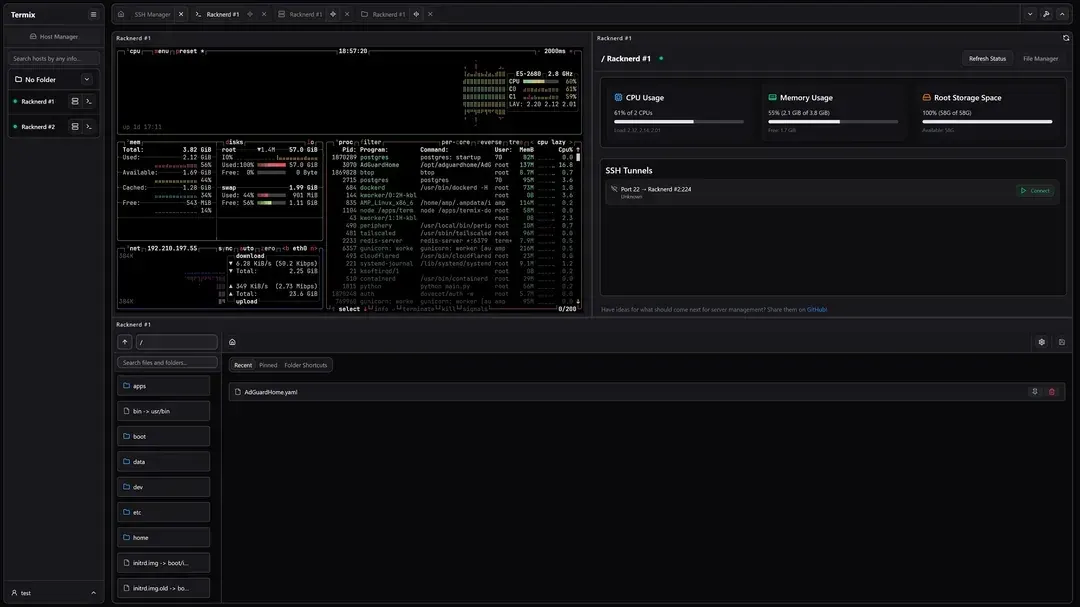
To present to you Turnex, the son of Durex - Yello - yeah I know.
If you've spent any time managing more than a handful of servers, you'll know the pain of juggling SSH config files, remembering which box has which port forwarded, and bouncing between a terminal window and a separate RDP or VNC client just to check on something. I've been running Termix on baden for a while now to solve exactly that problem, and it's earned a permanent spot in the stack.
What Termix Actually Is
Termix bills itself as a self-hosted, all-in-one server management platform, and that's a fair description. At its core it's an SSH host manager with a browser-based terminal, but it doesn't stop there. It also handles:
- SSH terminal access with split-screen support (up to four panels) and a tabbed, browser-like interface
- Remote desktop over RDP, VNC, and Telnet, straight from the browser
- SSH tunnel management, including automatic reconnection and health monitoring for local, remote, and dynamic SOCKS forwards
- A remote file manager with sudo support, inline editing, and server-to-server file moves
- Docker and Podman container management — start, stop, pause, remove, view stats, and drop into an exec terminal, without trying to be a Portainer replacement
- Host metrics, including CPU, memory, disk, network, uptime, firewall (iptables only - really - WTHM) and port monitoring, log viewing, and threshold-based alerts over ntfy or webhooks
On top of that there's proper RBAC, OIDC/LDAP/SSO support, 2FA and passkey login, a Tailscale integration that can pull devices straight from your tailnet, and even serial console support for the router or switch on your bench. It's the kind of tool that quietly replaces three or four browser tabs and a desktop app.
Why It Fits a Podman Homelab
Termix ships as a straightforward container, which made it an easy drop-in alongside the rest of my Podman stack on baden. The upstream Docker Compose example is simple enough to translate directly:
AI Generated code - please refer to official sources but basically it, mine is hardened. If you dont know what that means then look it up.
services:
  termix:
    image: ghcr.io/lukegus/termix:latest
    container_name: termix
    restart: unless-stopped
    ports:
      - "8080:8080"
    volumes:
      - termix-data:/app/data
    environment:
      PORT: "8080"
    depends_on:
      - guacd
    networks:
      - termix-net

  guacd:
    image: guacamole/guacd:1.6.0
    container_name: guacd
    restart: unless-stopped
    ports:
      - "4822:4822"
    networks:
      - termix-net
The guacd container is only needed if you want the RDP/VNC remote desktop features — if you're purely after SSH terminal and tunnel management you can drop it. I already run Guacamole's guacd 1.6.0 for other remote desktop work, so pointing Termix at the same service was trivial. Behind Zoraxy with a proper TLS cert, it's a single clean URL rather than a raw IP:8080.
The Bits I Actually Use Day to Day
SSH host manager with tags and folders is the obvious win — no more scrolling through a flat ~/.ssh/config trying to remember which container is which. Being able to save reusable credentials and automate SSH key deployment across hosts saves a genuine amount of time when you're standing up a new LXC.
Docker/Podman container management is deliberately lightweight. It's not trying to be Portainer, and it says as much in its own docs — it's for glancing at container stats or popping open an exec shell without a full management UI. That's exactly the right scope; Portainer stays for the heavier lifting.
Host metrics with threshold alerts is genuinely useful for catching things early. Feeding CPU, memory, and disk thresholds into ntfy means I get a push notification before something turns into a 2 a.m. problem, which pairs nicely with the forensic and diagnostic scripting I've already got running across the Proxmox host.
The Proxmox integration, which can auto-add hosts from a Proxmox instance, is a nice touch if you're managing a cluster rather than a single box — it saves manually re-entering every LXC and VM.
A Few Practical Notes
- The backend database is encrypted SQLite, so back up the data volume like you would any other credential store.
- If you're running it behind a reverse proxy like Zoraxy, remember that a wildcard cert only covers one subdomain level — same gotcha as any other service on a
*.baden.braedach.comstyle setup. - It's Apache 2.0 licensed, actively developed, and has picked up a fair bit of traction — GitHub's "Repo of the Day" back in September 2025 wasn't undeserved.
Verdict
If you're already self-hosting and have more than two or three servers to keep track of, Termix removes a surprising amount of friction. It's not trying to replace Portainer, and it's not trying to replace a dedicated monitoring stack — it sits in the gap between "SSH client" and "full infrastructure dashboard," and it does that job well. Worth a look if your homelab has outgrown a flat SSH config file.
Repo: github.com/Termix-SSH/Termix Docs: docs.termix.site
#enoughsaid