Dockhand: A Security-Minded Docker Management UI Worth Your Attention

Replacing Pulse, and putting container updates and vulnerability scanning to the test
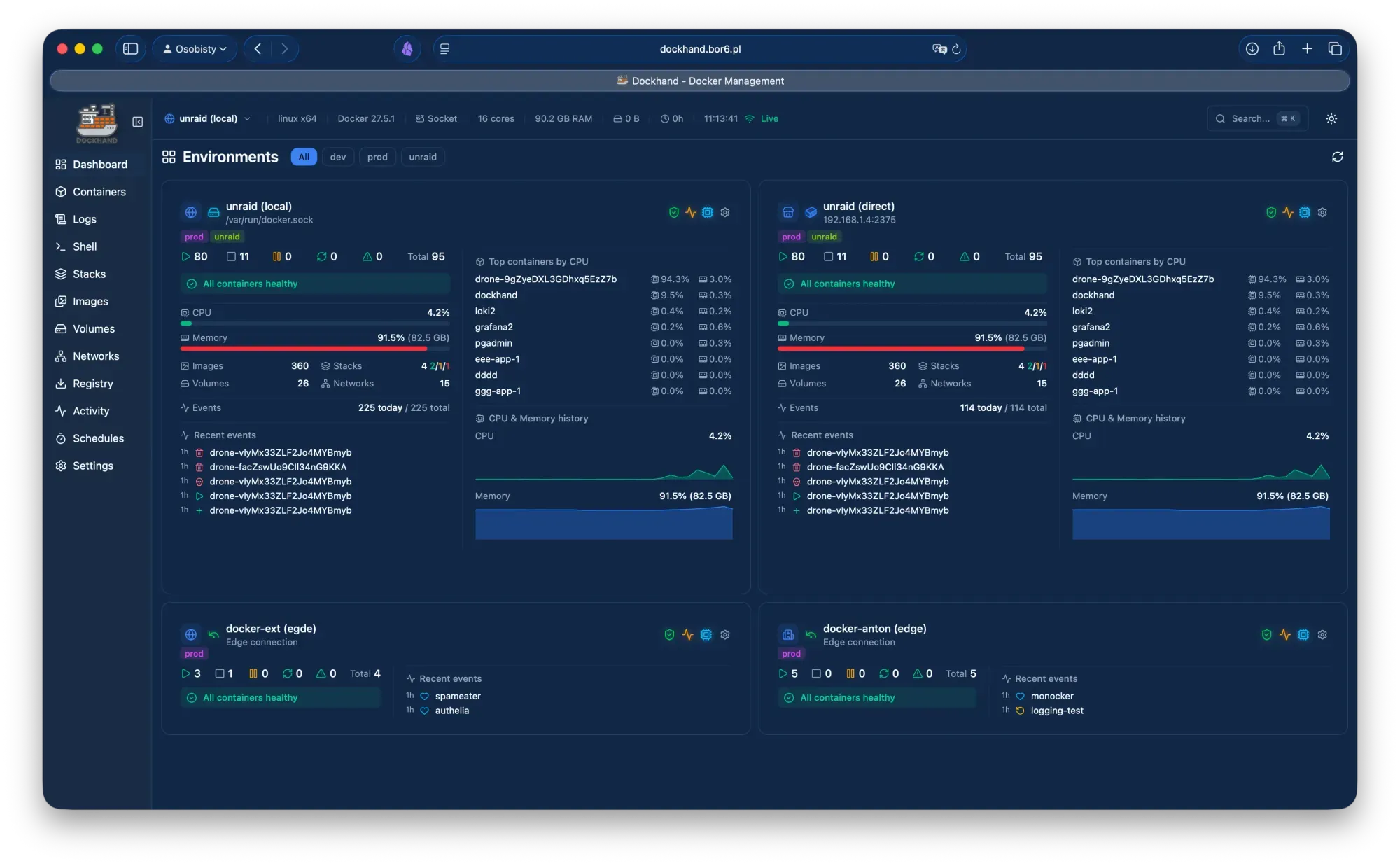
I recently retired Pulse from my homelab monitoring stack and replaced it with Dockhand. Pulse did its job, but I wanted one tool that could show me what was running, keep it updated, and tell me when an image was carrying known vulnerabilities. Dockhand does all three, and after a few weeks I like it. This post covers what it is, what it does well, and where it falls short.
I am still testing its container update and vulnerability functions, so treat this as a first-impressions review rather than a final verdict.
What is Dockhand?
Dockhand is a self-hosted web UI for managing Docker environments, built by Finsys on Bun and SvelteKit. The first public release was v1.0.0 in December 2025, and at the time of writing the current release is v1.0.49 (23 September 2026). It is not an orchestrator or a runtime. It sits in front of the container engine you already run and gives you a modern interface to it.
The feature set covers a lot of ground:
- Containers: lifecycle control, in-place CPU/memory/restart-policy changes without a restart, live network attach/detach, a web terminal, a file browser and real-time log streaming.
- Compose stacks: a visual editor with a dependency graph, a validator with one-click fixes, deployment from Git with webhooks, and adoption of stacks created elsewhere.
- Multi-host: the local socket, remote TCP with TLS, or the open-source Hawser agent, which connects outbound so hosts behind NAT or a firewall need no inbound ports.
- Security: Grype and Trivy scanning, a CVE dashboard, SARIF export, OIDC/SSO and TOTP MFA.
- Extras: notifications via SMTP, ntfy, Gotify, Discord, Slack, Telegram and others, a Prometheus
/metricsendpoint, a REST API with bearer tokens, external secret providers (1Password, Vault, Bitwarden, KeePassXC and more) and beta restic-based backups.
Getting started
Deployment is a single container with SQLite by default, so there is no database to stand up. PostgreSQL is optional. Point it at your container engine's socket, give it a data volume and you are running on port 3000. I put mine behind my reverse proxy, and it behaved like any other web app there.
Container updates and vulnerability scanning
This is the part I am testing hardest, and it is Dockhand's best idea.
Its safe-pull approach pulls a new image to a temporary tag and scans it before touching the running container. If the findings exceed your criteria, the temporary image is deleted and the container keeps running. Most auto-update tools pull, swap and hope. Scanning first turns updates from a leap of faith into a gate.
Some things I like about how it is put together:
- Update checks and scheduled updates can be set per container or per stack, with update-available badges on the dashboard and stack list.
- Labels give fine control:
dockhand.update=falseskips a container,dockhand.hidden=truehides it, anddockhand.prune=falseprotects an image from pruning. - Recent releases detect newer version tags for pinned images and link to release notes.
- Scan results aggregate into a single vulnerabilities dashboard, and SARIF export means findings can flow into DefectDojo or Dependency-Track.
[Add your own results here: which containers you updated, what the scanner caught, and how the update gate behaved.]
Pros
- Security is built in, not bolted on. Scan-before-deploy, SARIF export and encrypted credential storage show the developer takes the problem seriously. The project even builds its own hardened image from Wolfi packages and scans itself.
- SSO is free. OIDC and TOTP MFA are in the free tier. Only LDAP/AD, RBAC and compliance audit logging sit behind the Enterprise licence.
- Clean, fast interface. Everything is one or two clicks away, and the customisation (themes, columns, sidebar order) is generous.
- Light footprint. SQLite by default, zero telemetry, and it runs on a Raspberry Pi 4.
- Podman is a first-class concern. Recent changelogs include fixes for Podman container updates, including containers managed by systemd Quadlet units. Anyone running Podman should still test their own setup, but the developer is clearly paying attention.
- Rapid, responsive development. Releases arrive roughly weekly, and the changelog shows bug reports being closed quickly.
- Good multi-host story. Hawser makes remote and NAT-bound hosts easy to manage.
- Open API. The whole UI runs on a documented REST API, so automation is straightforward.
Cons
- The socket mount is a big trust decision. Like any Docker manager, Dockhand needs access to the container engine socket, which is effectively root on the host. A socket proxy and careful network exposure are sensible mitigations.
- It is source-available, not open source. The licence is BSL 1.1, converting to Apache 2.0 in 2029. That is fine for a homelab but worth understanding before you use it at work. The vendor's pricing page lists a commercial usage licence as a paid feature, while at least one third-party review describes it as free for internal business use, so read the licence text yourself.
- Commercial pricing is per host. SMB is $499 per host per year and Enterprise is $1,499. That adds up quickly for multi-host teams.
- A fast release cadence cuts both ways. Weekly releases mean fixes arrive quickly, but the changelog also shows regressions, such as an ARM64 crash in v1.0.20 and a bind-mount deployment regression in v1.0.39. Pin versions and read release notes before upgrading production.
- Some features are still maturing. Backups are labelled beta, and several roadmap items, such as a CLI, GPU monitoring and image building, are not here yet.
- It is not a monitoring system. If Pulse was doing alerting or historical metrics for you, Dockhand only partly replaces it. The Prometheus endpoint and notification rules help, but you may still want a dedicated metrics stack.
- Young project, small vendor. It has been public for under a year, and the long-term picture depends heavily on one company.
Who is it for?
Dockhand suits homelabbers and small teams who run several hosts and want a polished UI with real security tooling. It is less compelling if you have a single host and are comfortable with the CLI, or if you need enterprise RBAC without paying for it.
Verdict
I like Dockhand. The scan-before-update workflow is the standout, and it is a feature I now want in every tool that touches my containers. I will follow up once I have finished stress-testing updates and scanning across my hosts.
References
- Dockhand homepage, features, pricing and changelog: https://dockhand.pro/
- Source code (BSL 1.1): https://github.com/Finsys/dockhand
- Hawser agent: https://github.com/Finsys/hawser
- Virtualization Howto review (January 2026): https://www.virtualizationhowto.com/2026/01/why-dockhand-is-one-of-the-best-docker-management-tools-for-secure-operations/
- Bitdoze install and review: https://www.bitdoze.com/dockhand-docker-install/
- Hysen Labs project analysis: https://hysenlabs.com/en/projects/finsys-dockhand
- XDA Developers on Dockhand as a Portainer alternative: https://www.xda-developers.com/i-finally-found-the-best-portainer-replacement/