Server Replacement & AI

I have begun a cost analysis of a replacement server. In this endeavour I have 4 prerequisites
- Cost and upgradeablity
- Storage - how much storage can I add without a NAS
- AI TOPS ability
- Bang for buck with a smaller form factor - mini PC type
Lots of things come into play here but I found the following interesting as I was researching paragraph 3 so am sharing.
Edge AI Accelerators vs. Consumer GPUs: Axelera Metis vs. RTX 50-Series and RDNA 4
Dedicated edge AI accelerators like Axelera's Metis line are pitched as low-power alternatives to running inference on a full-fat GPU. But how do the numbers actually stack up against the GPUs most homelabbers and small deployments already have sitting in a PCIe slot? This post lines up Axelera's entire Metis card family against Nvidia's RTX 50-series and AMD's RDNA 4 (RX 9000-series), plus an older but still very common RTX 30-series card, and looks past the marketing TOPS figures to something closer to an apples-to-apples comparison.
A quick note on "TOPS" before we start
TOPS (Tera Operations Per Second) numbers are not directly comparable across vendors unless you know exactly what precision and sparsity assumptions sit behind them. This trips a lot of people up when shopping for AI hardware:
- Nvidia's headline "AI TOPS" figures for the RTX 50-series are sparse FP4 numbers — a 4-bit floating point format combined with 2:4 structured sparsity (meaning roughly half the values are zeroed out and skipped). This produces very large headline numbers.
- AMD's RDNA 4 headline figures are typically sparse INT4.
- Axelera's Metis figures are dense INT8 — no sparsity assumption, and a more conservative (and arguably more broadly useful) precision than 4-bit formats for most computer vision workloads.
To make a fair comparison, this post normalizes everything down to dense INT8 TOPS wherever possible, which is a reasonably conservative, apples-to-apples baseline. Where a card's dense INT8 figure isn't officially published, it's estimated from official sparse figures (halved, per the architecture whitepapers) or from vendor-stated generational uplift claims, and flagged as an estimate.
The Axelera Metis lineup
Axelera's Metis AIPU (AI Processing Unit) is a quad-core chip built on a RISC-V-based, Digital In-Memory Computing architecture, aimed squarely at computer vision inference at the edge — object detection, pose estimation, segmentation, multi-camera pipelines, and (more recently) small local LLMs. It comes in three product forms, all built around the same underlying chip:
| Card | Form factor | AIPUs | Peak INT8 TOPS | Memory | Typical power | Approx. price (new) |
|---|---|---|---|---|---|---|
| Metis M.2 | M.2 2280 M-key | 1 | 214 | 1 GB DRAM | 3.5–9 W | ~AUD 400 (€229.95) |
| Metis PCIe (1-chip) | PCIe HHHL single-slot | 1 | 214 | 4 GB (16 GB on request) | 8–15 W | ~AUD 610 (€349.95) |
| Metis PCIe (4-chip) | PCIe Gen3 x16 | 4 | 856 | 16 GB or 64 GB | 30–58 W | ~AUD 2,000 (est., contact for pricing) |
All three variants connect over PCIe Gen3 x4 per chip (so the 4-chip card uses an x16 physical slot to give each AIPU its own x4 lane), run at 15 TOPS/W rated efficiency, and share the same security features (Secure Boot, Root of Trust) and the same Voyager SDK software stack — meaning a model compiled for one Metis card generally scales cleanly to the others. Benchmarks published by Axelera for the 4-chip card include figures like 1,539 FPS on YOLOv5m and roughly 12,800 FPS on ResNet-50 across the four AIPUs.
The GPU side of the comparison
Three GPUs were used as reference points: an RTX 3070 (Ampere, 2020 — still extremely common in the secondhand market), an RX 9070 XT (RDNA 4, AMD's current high-end mainstream card), and an RTX 5090 (Blackwell, Nvidia's current flagship).
| Card | Dense INT8 TOPS | Marketed headline figure | TDP | Approx. street price (AUD) |
|---|---|---|---|---|
| RTX 3070 | 162.5 (official, dense) | — | 220 W | ~350 (secondhand) |
| RX 9070 XT | ~390 (estimated from AMD's stated 4x INT8 uplift over RDNA 3) | 1,557 TOPS (sparse INT4) | 304 W | ~900–1,150 |
| RTX 5090 | 838 (official, dense, per Blackwell whitepaper) | 3,352–3,400 "AI TOPS" (sparse FP4) | 575 W | ~5,500–5,900 |
Worth calling out explicitly: the RTX 5090's marketed 3,400 TOPS figure is roughly 4x its actual dense INT8 throughput. That's not dishonest, but it is a different measurement than what Axelera publishes for Metis, and conflating the two produces wildly misleading comparisons.
Chart 1: Raw compute (dense INT8 TOPS)
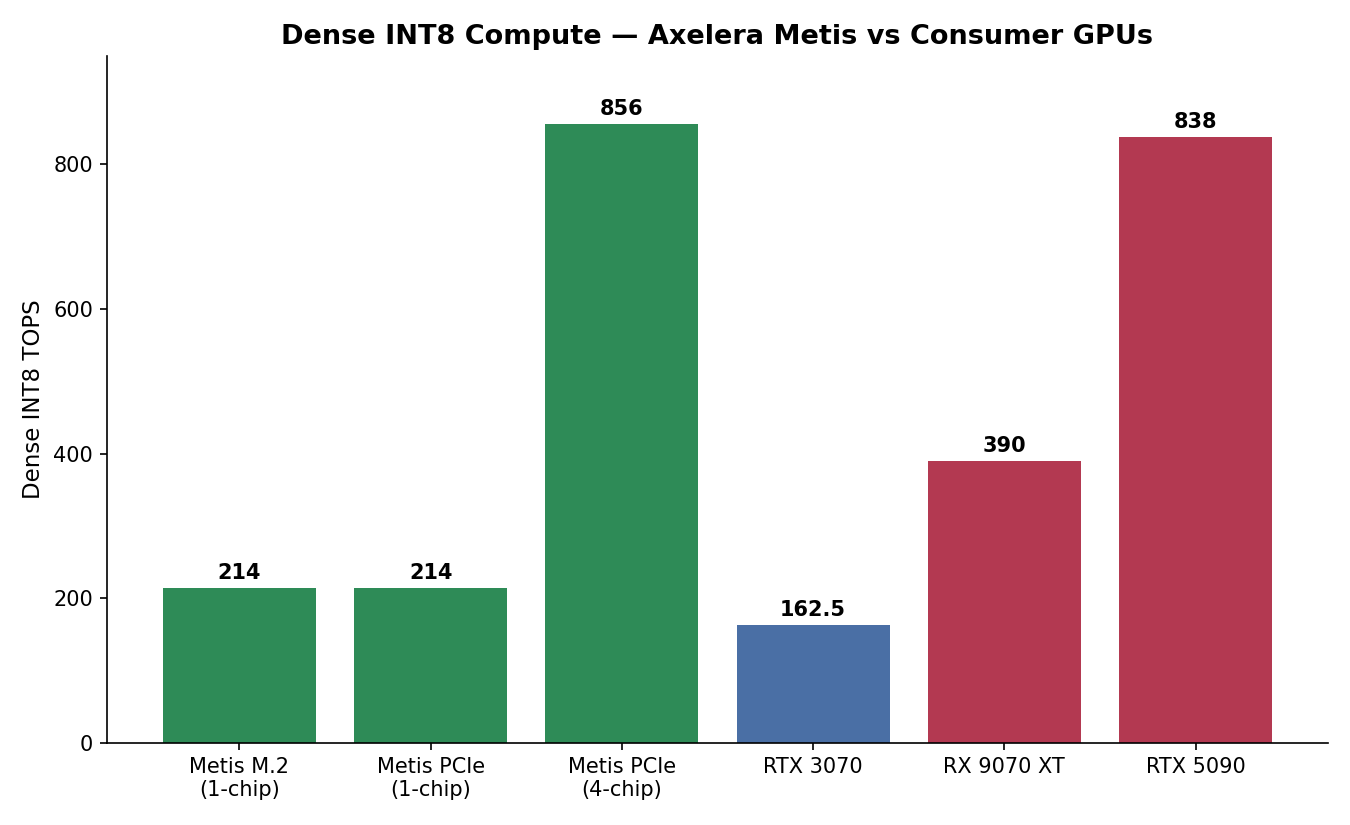
On raw normalized compute, the picture is closer than the marketing numbers suggest. A single Metis chip (214 TOPS) already outperforms an RTX 3070 (162.5 TOPS) and sits at roughly half an RX 9070 XT. The 4-chip Metis PCIe card (856 TOPS) is actually slightly ahead of a single RTX 5090 (838 TOPS) on this normalized measure — a notable result for a card drawing a fraction of the power.
Chart 2: Power efficiency (TOPS per Watt)
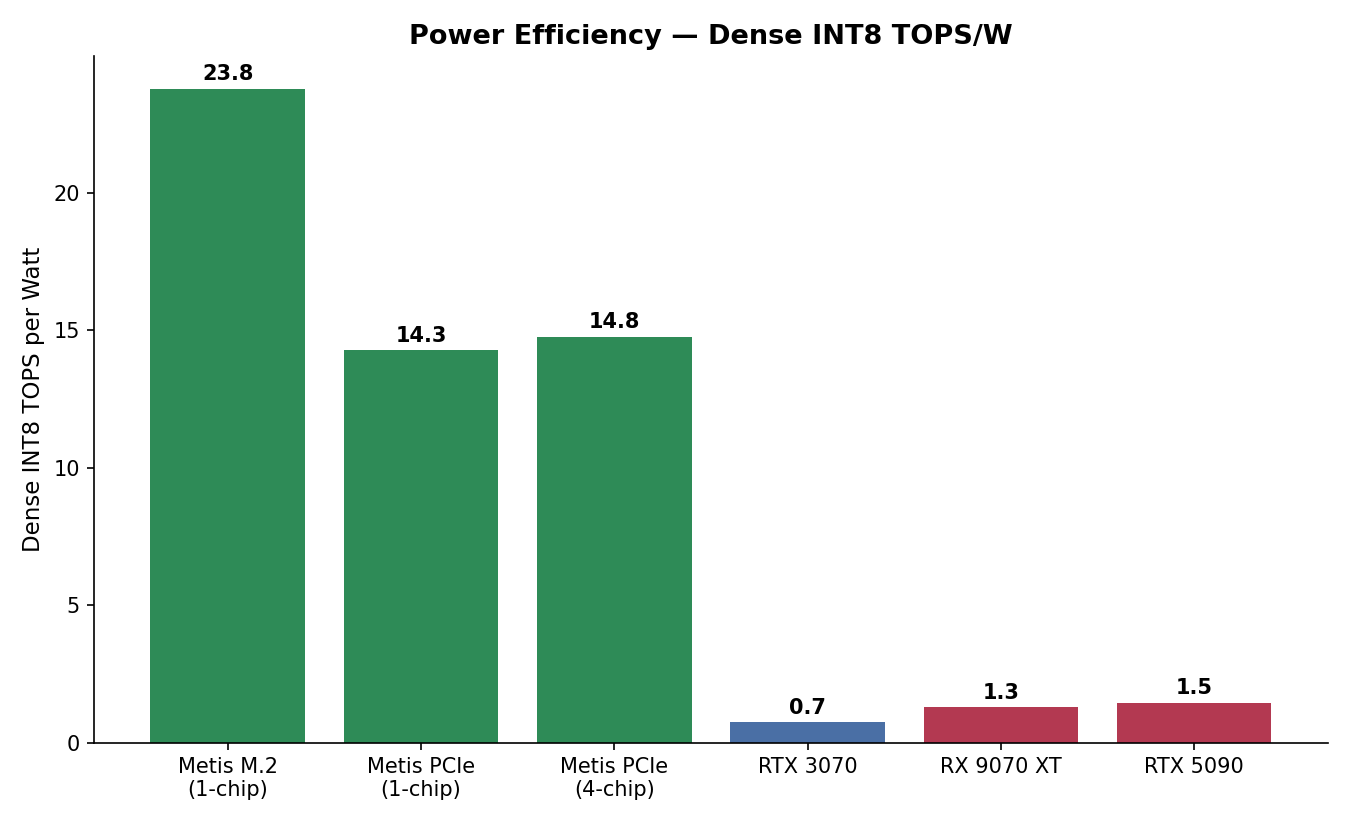
This is where the architectural difference really shows. Every Metis variant clusters in the 14–24 TOPS/W range, while every GPU sits at roughly 1–1.3 TOPS/W. That's not a marginal gap — it's an order of magnitude. This is the expected result of comparing a chip purpose-built for fixed-function INT8 inference against general-purpose GPUs that also have to carry rasterization hardware, ray tracing cores, display engines, video encode/decode blocks, and everything else a graphics card needs to do.
Chart 3: Cost efficiency (AUD per TOPS)
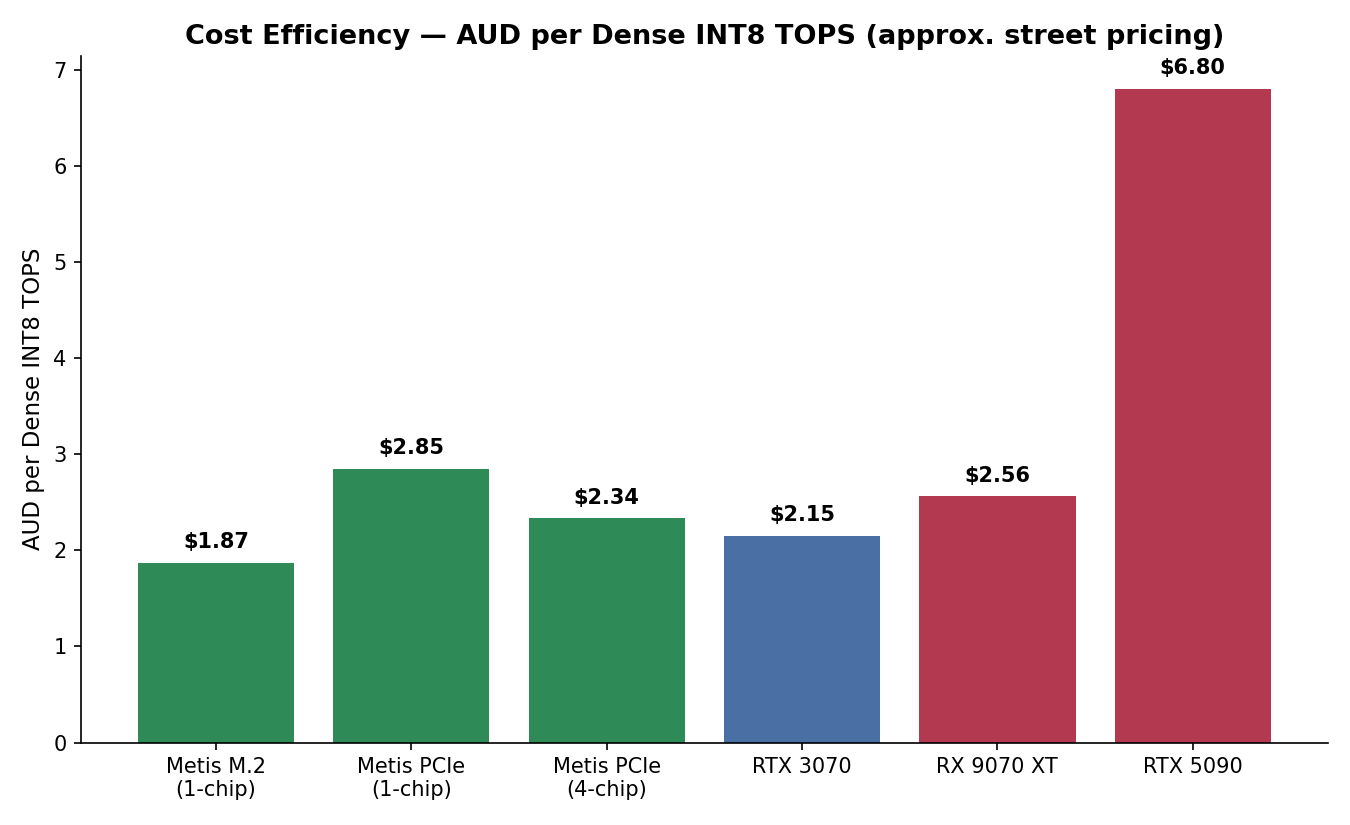
Cost efficiency tells a more mixed story. A secondhand RTX 3070 remains the cheapest way to get INT8 throughput in raw dollar terms, purely because the secondhand GPU market has depreciated so much. The Metis cards land in a similar or slightly better cost-per-TOPS band than new GPUs, and dramatically better than an RTX 5090, but a used previous-generation GPU is still hard to beat on pure $/TOPS if power draw isn't a constraint.
Pros and cons
Axelera Metis (all variants)
Pros
- Exceptional power efficiency — single-digit to double-digit watts vs. hundreds of watts for a GPU doing comparable INT8 work
- Competitive or better raw dense INT8 throughput than the GPUs it's often positioned against
- Small form factor (M.2 variant especially) suits space- and power-constrained builds
- Secure Boot and Root of Trust built in
- Voyager SDK provides a model zoo, YAML-based pipeline builder, and PyTorch/ONNX compiler support, aimed at fast prototyping for vision pipelines
- Scales cleanly from 1 to 4 chips on the same software stack
- GPL-2.0-licensed, publicly available Linux kernel driver source
Cons
- Inference only — no training support; a GPU (or cloud) is still needed for that side of the workflow
- Locked to INT8 quantized models via the Voyager SDK toolchain; not a general-purpose compute card
- Ecosystem is far younger and smaller than CUDA or ROCm — fewer pretrained models, less community troubleshooting history, and workloads outside computer vision (small LLMs aside) are not a strong fit
- PCIe passthrough into virtual machines is explicitly labelled Beta in the current SDK, with documented failures passing the card through via VFIO into a KVM guest, even when the same card works fine on the bare-metal host
- Newer product still working through driver maturity issues — community forum threads show recurring PCIe enumeration problems, IOMMU conflicts, and platform-specific quirks (ARM SMMU-v3, certain BIOS/UEFI combinations) that require manual troubleshooting
Consumer GPUs (RTX 3070 / RX 9070 XT / RTX 5090)
Pros
- Mature, extremely well-documented driver stacks (CUDA and ROCm) with over a decade of community tooling behind them
- General-purpose: handles training as well as inference, arbitrary model architectures, and non-vision workloads
- Broad framework support out of the box — PyTorch, TensorFlow, ONNX Runtime, llama.cpp, Ollama, vLLM, and so on, without a proprietary compilation step
- Straightforward, well-trodden PCIe/GPU passthrough paths into both containers and VMs
Cons
- Power draw is an order of magnitude higher for comparable INT8 throughput
- Secondhand market pricing is volatile (RTX 5090 pricing rose double digits percent within a couple of months in early 2026 due to memory supply issues), and new flagship pricing is now firmly in the AUD 5,500+ bracket
- Idle power draw and thermal/noise output are non-trivial in a homelab context if the card is dedicated to a single lightweight inference task
- Consumer GPUs generally lack ECC memory and the reliability features of proper datacenter accelerators, though this rarely matters for inference-only workloads
Driver support and Linux compatibility
This is the section that actually decides whether any of this is usable in a real Linux server or hypervisor environment, so it's worth going through in some detail.
Axelera Metis
The Metis kernel driver (metis.ko) is open-source, GPL-2.0-licensed, and available from Axelera's axelera-driver GitHub repository. It supports DKMS (Dynamic Kernel Module Support), so it automatically rebuilds against new kernels rather than breaking on every kernel update — a meaningful quality-of-life feature for a rolling-release or frequently-updated host.
Officially supported host distributions are Ubuntu 22.04 and 24.04 LTS, installed either via the Voyager SDK installer script or a native .deb package (metis-dkms) from Axelera's own APT repository. Debian 12/13, Red Hat Enterprise Linux 9/10, and Yocto-based builds are also documented as supported, though Yocto currently only gets the kernel driver natively — the full Voyager SDK runtime still needs to run inside a container on that platform. Native Windows 10/11 and Windows Server 2025 inference support also exists, but SDK development itself remains Linux-only.
For anyone running a hypervisor: this is where things get more nuanced. Community reports (including one specifically from a Proxmox VE 9.1.9 host running kernel 7.0.0-3-pve, which is Proxmox's kernel branding for a Linux 6.14 base) show that:
- The card works cleanly on bare metal on the Proxmox host itself — the Python runtime API loads models and runs inference with no issues.
- Passing the card through via VFIO into a KVM/QEMU guest currently fails with a DMA transfer error, even though the card is correctly isolated in its own IOMMU group. Axelera's own SDK release notes list KVM PCIe passthrough as Beta as of SDK 1.6, which lines up with these reports.
Practically, this means that on a Proxmox (or similar KVM-based) host today, running Metis inside an LXC container that shares the host kernel — rather than a full VM with device passthrough — is the more reliable path, since the driver only needs to be loaded once on the host and the device node can be bind-mounted straight into the container. Full VM-based GPU-style passthrough is realistically not yet production-ready for this hardware.
Other recurring community pain points worth knowing about before buying: PCIe enumeration failures on some host/BIOS combinations (a few threads mention the card not appearing in lspci at all until IOMMU settings, UEFI configuration, or boot order were adjusted), and at least one open issue with the ARM SMMU-v3 IOMMU implementation on Rockchip RK3588-based boards. None of these are dealbreakers, but they're the kind of first-week teething problems typical of a driver stack that's still maturing, rather than the "just works" experience of a 15-year-old GPU driver.
Nvidia (RTX 30-series / RTX 50-series)
Nvidia's Linux driver situation has shifted meaningfully in recent generations. Ampere-and-newer GPUs (which includes the RTX 3070) can run either the traditional proprietary driver or Nvidia's open-source kernel modules (nvidia-open), and Blackwell-generation cards (RTX 50-series) require the open kernel modules — the legacy closed modules aren't an option on that generation. Both driver flavours are DKMS-friendly, ship in most major distributions' repositories or via Nvidia's own CUDA repo, and have years of homelab-specific tooling around GPU passthrough into both LXC containers (bind-mounting /dev/nvidia* device nodes) and full VFIO VM passthrough. This remains the most travelled path for GPU acceleration in a Proxmox environment, with extensive community documentation for both approaches.
AMD (RX 9070 XT / RDNA 4)
AMD's amdgpu driver is fully mainlined into the Linux kernel itself — no DKMS, no out-of-tree module, no proprietary installer required for basic operation. Compute workloads (ROCm) require a separate userspace stack, which has historically lagged CUDA in framework coverage and can be more particular about supported GPU/kernel/distro combinations, though RDNA 4 support has been improving. Because the kernel driver is upstream, passthrough into LXC containers or VMs tends to be comparatively low-friction — there's no out-of-band module to build or maintain against kernel updates.
Summary
Normalized to dense INT8, the gap between a purpose-built edge inference chip and a consumer GPU is much smaller than headline marketing TOPS figures suggest — a single Metis chip already outperforms an RTX 3070, and four of them roughly match an RTX 5090. Where Metis pulls dramatically ahead is power and cost efficiency for inference-only workloads. Where GPUs remain the clear choice is generality: training, arbitrary model support, mature driver stacks, and — for now — safer virtualization behaviour, since Metis's VM passthrough story is still explicitly Beta. For a fixed vision inference task on a Linux host willing to run the workload in a container rather than a VM, Metis is a compelling, low-power option today. For anything that needs flexibility, training, or clean GPU passthrough into virtual machines, a conventional GPU remains the safer bet for now.
Hmmm - hold that shopping basket.
Interesting with a few caveats.
#enoughsaid