Pulse - Infrastructure Management

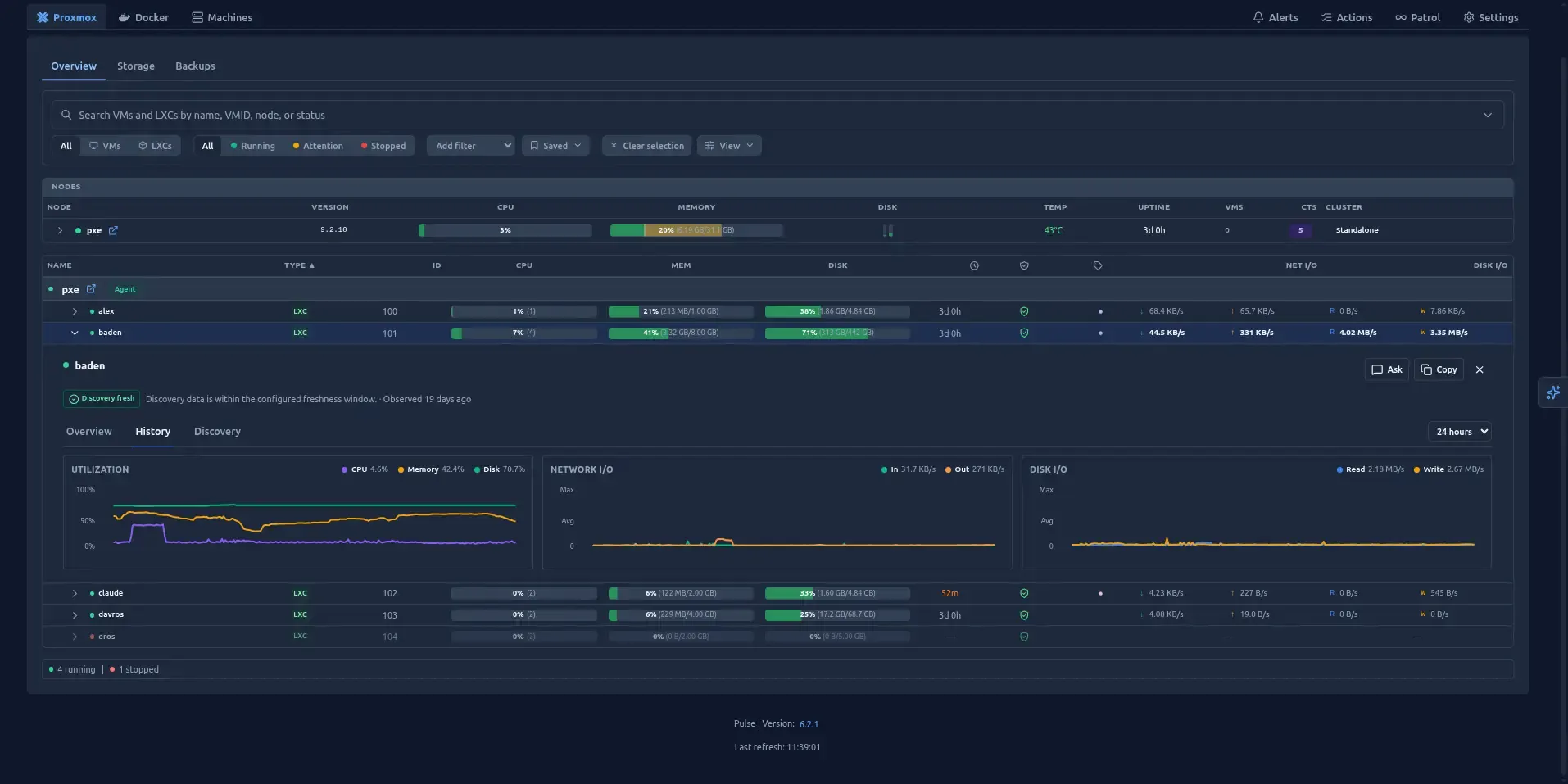
I have been reading XDA and Brandon Lee again and I find this utility meantioned alot.
After stuffing about for a while I decided to give it a run, and this is the result.
Pulse Monitoring CE: What It's Actually Like to Run
I'm deliberately not reviewing this as a Pro user. Pro is a genuinely good product, but at $79/yr (or $8.99/mo) on top of everything else a homelab already costs to run. CE covers the vast majority of what you actually need, and it's the edition I think most of this audience should be evaluating.
Two things you'll want set up before you start
Pulse's headline feature beyond basic dashboards is Patrol — scheduled background health checks (every 10 minutes to every 7 days) that go looking for the kind of problems a static alert rule never catches: a ZFS pool creeping toward full, a backup job that's been silently failing for weeks, a VM stuck in a restart loop, clock drift that's about to cause you a cluster headache. Patrol findings are free on every tier, including CE, but only if you bring your own LLM — OpenAI, Anthropic, Gemini, or a local Ollama instance if you want it fully air-gapped.
That means, in practice, there are two prerequisites before Pulse is doing anything beyond basic metrics:
- A working LLM setup. If you're not already running Ollama (or paying for API access to a hosted model), budget time for this first. Patrol and the in-app assistant are both dead weight without it.
- Actually configuring Patrol and the assistant themselves. Wiring up the LLM key doesn't automatically turn either on — there's a separate setup step under Settings → Pulse Intelligence, and it's easy to assume you're done when you're not.
Neither of these is a criticism of Pulse specifically — this is the same tax every self-hosted AI-adjacent tool charges you — but if you've read a glowing review that made Patrol sound like it's on from first boot, it isn't. Plan for it.
Where the deployment friction actually is
This is the part most reviews skip, because most reviewers install it once on a clean lab and move on. Running it for a while surfaced a few genuine rough edges:
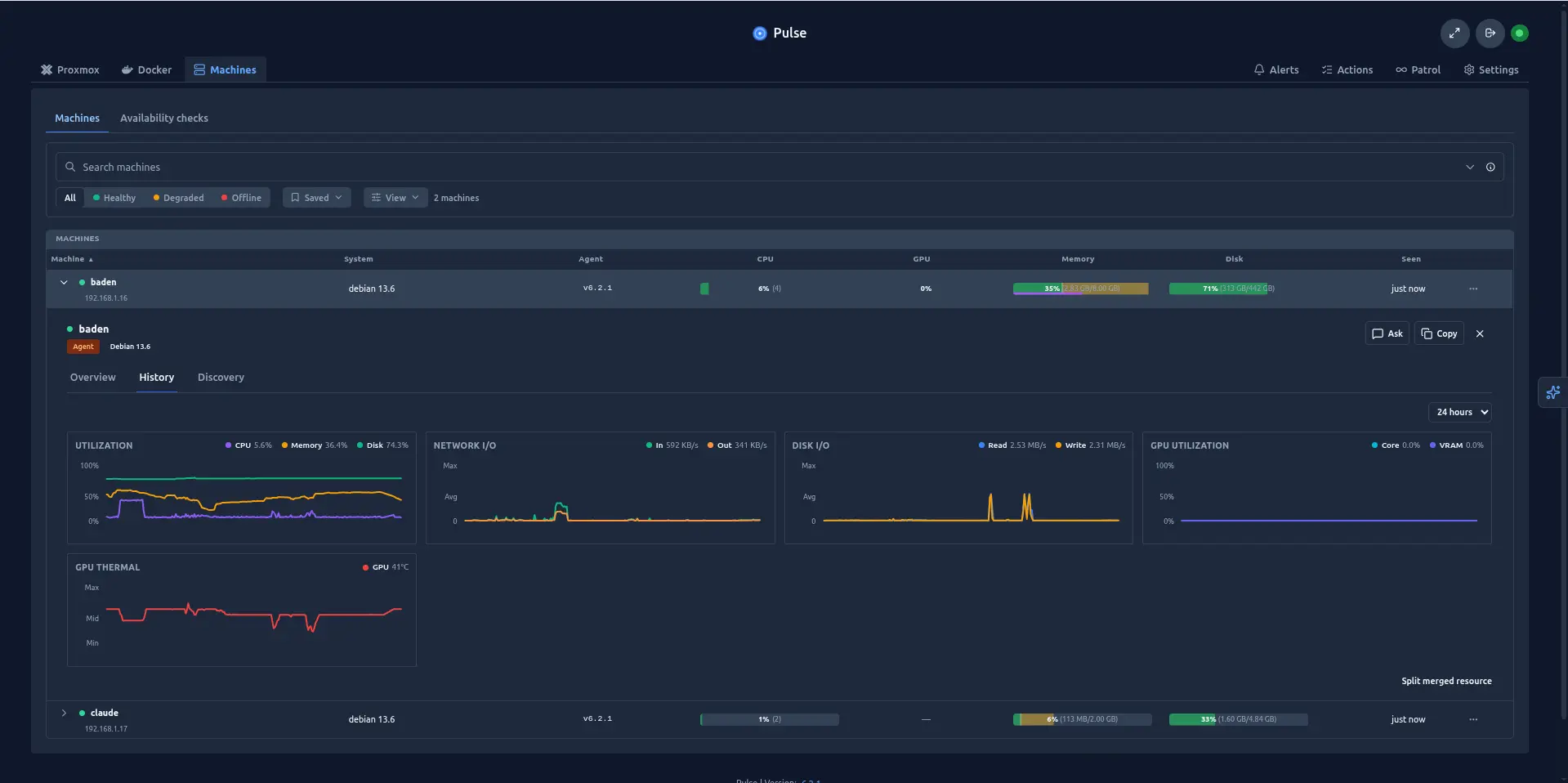
Command-executing agents on LXC are harder to get working than they should be. Proxmox itself needs no agent at all — it's read entirely over the API — but Docker/Podman hosts, and anything you want host-local telemetry (SMART, temperatures) or remote command execution from, need the unified agent installed. Getting an agent's command channel actually admitted, as opposed to just reporting metrics, was the part that gave me the most grief. It's a documented, deliberate security boundary — Pulse disables agent command execution by default and gates it behind explicit configuration.
API tokens need their permissions edited before agent deployment will work properly. Pulse's installer does generate a privilege-separated Proxmox API token with sensible read/monitoring ACLs out of the box, which is the right default. But the moment you want anything beyond passive monitoring — command execution being the obvious one — that default-scoped token isn't enough. It took me a while to figure out the sequence of actions required to deploy a remote command capable agent on LXC systems.
Reverse proxies need to handle WebSockets properly, or the agent control plane silently breaks. The web UI, REST API and agent control plane share a port by default, and the agent command channel runs over wss://. If your reverse proxy terminates or buffers WebSocket upgrades incorrectly, you get the same symptom as the token issue above — agents report in fine, commands go nowhere. If you're running Zoraxy (or Nginx, Caddy, Traefik, anything), double-check WebSocket passthrough is explicitly enabled on the Pulse host, not just assumed. This was easy to fault find by reading the systemctl status of the agent.
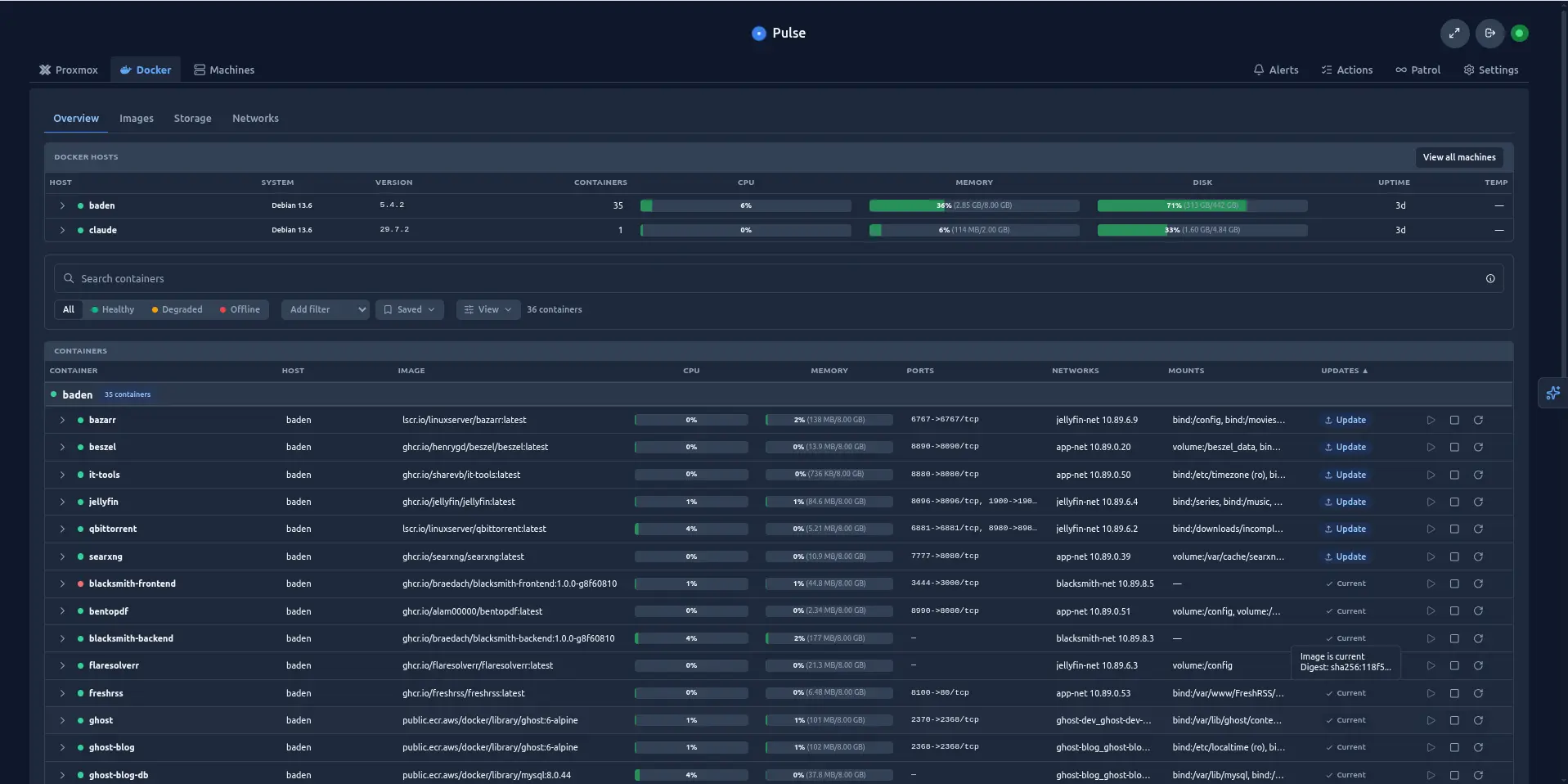
docker.io images with multiple tags are an outstanding, unresolved problem. Pulse's Docker update-checker works well for most images, but it currently mishandles multi-arch/OCI-index images — this is a confirmed, open bug affecting things like the entire LinuxServer.io (lscr.io/linuxserver/*) catalogue, which shows "Check failed" instead of a real update status. There are also separate reports of images showing an update is available, the update button being pressed, the container restarting, and the image not actually changing. If your stack leans heavily on LinuxServer.io images — and most homelabs do — don't take Pulse's update badges as gospel yet; spot-check manually.
Not resolved other than switching images with container services to a non docker.io related image.
None of these are dealbreakers, but they add up to a setup process that's noticeably less "five minutes and done" than the marketing and the glowing YouTube reviews suggest, at least once you go past a single Proxmox node with no agents.
Where Pulse genuinely earns its reputation
Once it's actually working, the feature set is hard to fault:
- Container-level commands from inside Pulse. Restarting a stuck container, running diagnostics, pushing an image update — you can do a meaningful chunk of day-to-day container admin without opening a separate SSH session or Portainer tab.
- Built-in image update checking that makes Watchtower (and similar tools) largely redundant — for the images it correctly identifies, at least. It's one less standalone service to run and patch, which matters when you're trying to keep your stack lean.
- Per-container alerting, which tools like Beszel still don't do. Beszel is excellent, lightweight, general-purpose server monitoring, but it stops at the host level. Pulse's alerts go down to individual containers and services — a specific container failing its health check fires its own alert, not just "the host is fine but something on it isn't."
For example - containers in a multiple reboot loop because you made a gaff. - A UI that's actually built for scale, not just a homelab demo. Pulse publishes its own regression testing against a simulated 500-node, 2,000-metric-series topology, and it shows — filtering, grouping, and the command palette (
Cmd+K) all hold up whether you're looking at three LXCs or a much larger fleet. Most homelab dashboards start to creak well before that.
The cons, from my own use and from digging around
A few things worth knowing before you commit, beyond what I hit myself:
- It's a single-maintainer project. Pulse is written and run by one developer (Richard Courtman), openly acknowledged on the project's own GitHub page. That's not unusual for self-hosted tools, and the responsiveness has genuinely been good — but it's a real bus-factor risk to have in the back of your mind for anything you're relying on for alerting.
- The v6 licensing rollout had real teeth-cutting bugs. Earlier this year, users reported that the recommended LXC installer path could land on a v6 pre-release build that incorrectly showed an expired Pro license and a hard cap of one monitored device — on what was supposed to be a free CE install. The maintainer confirmed and fixed both the installer bug and the underlying entitlement bug quickly once flagged, but it's a reminder that a tiered-licensing self-hosted product is more moving parts than a purely open-source one, and worth checking you're actually on the version you think you are after installing.
- LXC deployments with the temperature/sensor bind mount can break Proxmox snapshots and live migration unless you switch the mount to an
lxc.mount.entrydirective instead of the defaultmp0bind point — a known Proxmox limitation with bind mounts generally, not really Pulse's fault, but it'll bite you if you don't know to look for it. - No third-party security audit or penetration-test attestation, which Pulse is upfront about on its own security page. The trust model is well-documented and the code is open, but if your risk tolerance needs an external audit trail rather than "read the source yourself," that's not there yet. So dont install it on your companies servers 😄, without the appropriate authorisation.
- CPU usage complaints on very large deployments have come up on the Proxmox forums, though this seems to have improved significantly since earlier versions — one user reported acceptable usage monitoring 500+ VMs across 22 nodes.
CE vs Relay vs Pro vs MSP
Pricing and tier boundaries as of writing (self-hosted plans; Cloud and MSP are separate hosted paths):
| Capability | Community (free) | Relay ($39/yr · $4.99/mo) | Pro ($79/yr · $8.99/mo) | MSP (from $149/mo) |
|---|---|---|---|---|
| Proxmox VE/PBS/PMG, Docker/Podman, Kubernetes, TrueNAS, vSphere, Ceph monitoring | Yes | Yes | Yes | Yes |
| Metric history retention | 7 days | 14 days | 90 days | Per client workspace |
| SSO (OIDC/SAML, multi-provider) | Yes | Yes | Yes | Yes |
| Update alerts | Yes | Yes | Yes | Yes |
| Patrol findings (your own LLM key or local Ollama) | Yes | Yes | Yes | Yes |
| Remote web UI access without your own VPN/tunnel | No | Yes | Yes | Yes |
| Pulse Mobile pairing + push notifications | No | Yes | Yes | Yes |
| Patrol issue investigation + policy-gated auto-fixes | No | No | Yes | Yes |
| Centralized agent profiles | No | No | Yes | Yes |
| Role-based access control | No | No | Yes | Yes |
| Tamper-evident audit logging (HMAC-signed, SIEM webhook export) | No | No | Yes | Yes |
| Infrastructure reports (PDF/CSV) | No | No | Yes | Yes |
| Multiple isolated client workspaces | No | No | No | Yes (5 to 40+ depending on plan) |
A couple of things worth calling out from that table: Community is genuinely not crippled — it isn't paywalled monitoring with a nagware timer. SSO ships free on every tier, and none of the self-hosted plans charge by how many VMs, containers, or nodes you're watching; a top-level "monitored system" counts once regardless of how many child resources (VMs, disks, backup jobs) sit under it.
Where I've landed
For a single-hypervisor or small-cluster homelab, CE is the right call, full stop — you're not losing meaningful functionality, just remote-access convenience and the Pro-tier admin/compliance features that are aimed squarely at teams and MSPs, not a home rack. Relay's $39/yr is worth a look if you don't already have Tailscale or a VPN back into your network and want push notifications on your phone when something breaks. Pro is a harder sell unless you're running this for other people, or the auto-fix/audit trail features specifically matter to you.
I would go with a VPN and most homelabbers have one.
Go in expecting the LLM/Patrol setup tax up front, budget time for the agent/token/reverse-proxy friction if you want command execution rather than read-only monitoring, and don't fully trust the Docker update badges yet if LinuxServer.io images make up a chunk of your stack. Past that, it's genuinely one of the better pieces of self-hosted tooling I've added this year.
I like what Pulse can do. It is already alerting me to various problems on my hypervisor and its usefulness in relation to container administration is great.
References
- Pulse — GitHub repository
- Pulse — self-hosted pricing and FAQ
- Pulse Agent Security documentation
- Pulse Configuration documentation — agent control plane / WebSocket
- GitHub Issue #1583 — Docker update-check fails for multi-arch/OCI-index images
- GitHub Issue #988 — Docker images not updating
- GitHub Issue #738 — LXC bind mountpoint breaks snapshots/migration
- GitHub Discussion #1434 — v6 installer/licensing bug report and fix
- SourcePulse project review — maintainer/bus-factor note
- Proxmox Support Forum — Pulse resource usage thread
- InstaPods — Beszel vs Pulse comparison
Its growing on me alot. It is definitely worth a look if the number of containers you are managing is becoming a chore. After all you want to be developing not maintaining.
 rcourtman
Next step is automation. This I have not done yet. I hate multitagged images.
By the way, just in case it escaped you. If you are using github based images, you can setup github within your account to get notified about new releases for your "container services" along with security alerts. This I would consider a minimum. I have got rather lax about this lately but I thought it is worth meantioning.
After all - it is wise to check for breaking changes to releases and if there is a security alert on a container service you actually make available on the internet not taking into account your reverse proxies or tunnels WAF capabilities, you might get into issues.
One final note. Watch your LLM costing if you went with outsourcing. Choosing the wrong model without safeguards will bite you big time.
#enoughsaid